

Home Assessment Checklist & Intake Guide
Collect home facts for preliminary scoring and whole-home retrofit planning with the Green Home Predictor.
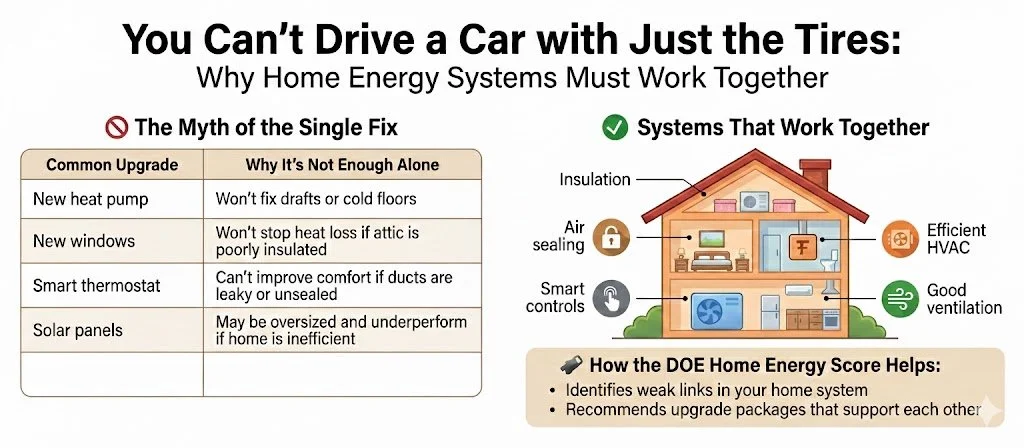
Heat, air, and moisture do not stay politely in one place. They move across connected surfaces—not just through furnaces or windows. Therefore, it makes sense to follow building science and treat the home as one interconnected system. A great starting point is the logic behind the Department of Energy’s Home Energy Score (HES).
Whether you collect home facts with our screening tool or start with an existing professional audit such as a HES, this intake layer helps organize information for preliminary planning. Additional assessment and documentation may be required for a particular program. Use the information to map a clear project pathway that can be implemented all at once or over time.
Planning, not certification: A Green Home Predictor score is a preliminary planning metric, not an official DOE Home Energy Score, HERS Index, or determination of program eligibility.
📋 Project Intake & Screening: Start Here with the Green Home Predictor
Before entering a home, print the Home Facts Catcher intake form or use the mobile Home Facts Catcher to organize your site observations. Either method helps you collect home facts for entry into the Green Home Predictor. Record what is known, mark unknowns, and keep supporting photos or documents.
📋 What You’ll Collect:
- Project/home name and address or cross streets
- ZIP code, year built, conditioned floor area, and number of stories
- Average ceiling height and climate zone, if known
🧠 Why It Matters
This sets the baseline. The home’s age, size, height, and location help estimate heating and cooling loads, likely insulation levels, and the climate conditions the home must perform under.
🔬 Building Science Connection
This helps define the thermal boundary, the volume of conditioned space, and the basic load assumptions used for comfort and retrofit planning.
📋 What You’ll Collect
Identify the layer separating conditioned living space from the outdoors or unconditioned space:
- Attic/Ceiling Type: Vented, unvented, cathedral, finished/knee walls, none, or unknown.
- Insulation Levels: Floor/ceiling insulation, from none/R-0 to high/R-49+, or roof deck insulation if the boundary is at the roofline.
- Roof Deck Insulation: Only use this if the thermal boundary is at the roof deck.
- Air Sealing Status: Yes, no, partial, or unknown.
- HVAC & Layout Clues: Note any ducts, air handlers, finished attic spaces, knee walls, or other clues that affect where the thermal boundary is located.
🧠 Why It Matters
The attic or roof area is a critical control layer. Green Home Predictor maps this area so pros can tailor the right upgrade strategy:
- Boundary at Attic Floor: Focuses on air sealing, insulation depth, baffles, blocking, and proper attic ventilation.
- Boundary at Roof Deck: Focuses on roof deck insulation, encapsulation, moisture control, and whether ducts or equipment are being brought inside the conditioned space.
⚠️ Crucial for HVAC: Getting this right helps prevent errors when sizing new heating and cooling systems, because ducts and equipment can perform very differently depending on whether they sit inside or outside the thermal boundary.
📋 What You’ll Collect
Identify how the bottom of the home separates conditioned living space from the ground, outdoor air, or unconditioned space:
- Foundation Type: Conditioned basement, unconditioned basement, slab, vented crawlspace, unvented crawlspace, mixed, or unknown.
- Foundation Insulation Level: Unknown, none/R-0, some/low, moderate, or high/R-19.
- Rim Joist Status: Whether rim joists appear sealed and insulated: yes, no, partial, or unknown.
- Thermal Boundary Clues: Note whether the boundary appears to be at the foundation walls, the floor above the basement/crawlspace, the crawlspace walls, or the slab edge.
- HVAC & Layout Clues: Note any ducts, air handlers, boilers, furnaces, water heaters, or distribution piping located in the basement or crawlspace.
- Moisture & Safety Clues: Note visible moisture, bulk water, mold risk, dirt floors, open vents, combustion appliances, or other issues that should be reviewed before insulation or air sealing work.
🧠 Why It Matters
The foundation is the home’s bottom control layer. Green Home Predictor maps this area so pros can understand whether the basement or crawlspace is inside or outside the home’s thermal boundary.
- Conditioned Basement or Unvented Crawlspace: The focus may be foundation wall insulation, rim-joist sealing, moisture control, and keeping ducts or equipment inside the conditioned space.
- Unconditioned Basement or Vented Crawlspace: The focus may shift to the floor above, duct sealing/insulation, pipe protection, air leakage, and whether the space should remain outside the thermal boundary.
- Slab Foundation: The focus may include slab-edge conditions, floor comfort, moisture clues, and how the slab affects heating and cooling loads.
“An uninsulated basement is like living over a cold cave. You’re heating it whether you want to or not.”
⚠️ Crucial for HVAC: Getting the foundation boundary right helps prevent mistakes when planning heating and cooling upgrades. Ducts, boilers, air handlers, crawlspaces, rim joists, and basement walls can all affect comfort, load calculations, equipment sizing, and whether insulation or air sealing should happen before or alongside HVAC work.
📋 What You’ll Collect:
- Wall insulation level: unknown, none/R-0, some/low, moderate, or high
- Notes about wall construction, siding, or known insulation work if available
Walls are a major part of your thermal envelope. Re-siding can be an important opportunity to consider continuous insulation.
Recording Wall Insulation When the R-Value Is Unknown
Record the home’s age, known wall construction, and any documented insulation work. Use an R-value when supporting records or a qualified assessment establish it; otherwise, select unknown and note the available clues.
- Known information: Keep insulation records, construction details, or photos that support the entry.
- Observation versus assumption: Do not treat the home’s age or wall thickness alone as a verified insulation value.
- Planning defaults: Any default used later should be identified as an estimate, with its source and applicable region—not entered as a measured or observed fact.
For an official Home Energy Score assessment, follow the applicable assessor guidance. Visit the Home Energy Score website (opens in a new tab) for program resources.
📋 What You’ll Collect:
- Primary heating system type and fuel source
- Heating and cooling efficiency, if known, or year installed if efficiency is not known
- Cooling system type, including none, central AC, heat pump, mini-split, or window/room AC
- Secondary or supplemental systems, such as mini-splits, electric baseboard, wood/pellet stove, window AC, or backup systems
- Distribution type, duct insulation, duct sealing status, and duct location
🔎 How to Gather It
Look for a label on the furnace, boiler, heat pump, AC condenser, air handler, or mini-split outdoor unit. Record the manufacturer and model number and photograph the label. Copy any documented efficiency rating exactly as written, including AFUE, SEER/SEER2, HSPF/HSPF2, COP, or EER/EER2. If the rating is unavailable, record the approximate installation year and leave efficiency unknown.
🧠 Why Ducts Matter
Leaky or poorly insulated ducts can reduce the heating and cooling delivered to rooms, especially when ducts run through an unconditioned attic or crawlspace. Record their location, insulation, and apparent sealing condition. Have a qualified professional evaluate duct improvements alongside equipment options; do not assume a fixed whole-home energy-loss percentage or a guaranteed return on investment. See ENERGY STAR’s duct-sealing guidance (opens in a new tab).
📋 Equipment Efficiency: What to Record
Use documented equipment ratings when available. The installation year is useful background, but it does not verify a particular efficiency or cold-climate capability.
| Equipment | Record when documented | When the rating is unknown |
|---|---|---|
| Gas or oil furnace / boiler | AFUE for the identified model. | Record type, fuel, model, approximate installation year, and a label photo. |
| Air-source heat pump / mini-split | The stated heating and cooling ratings: HSPF or HSPF2; SEER or SEER2; EER or EER2. Keep the metric name with the number. | Record the indoor and outdoor model numbers when visible. Do not infer cold-climate performance from installation year alone. |
| Electric resistance heat | System type and equipment label information. | Identify baseboard, electric furnace, or other resistance equipment; do not substitute heat-pump ratings. |
| Wood / pellet equipment | Manufacturer-documented efficiency for the identified model, if available. | Record the equipment type, model, and label photo rather than assigning a generic percentage. |
Keep rating systems distinct: Do not relabel HSPF as HSPF2 or SEER as SEER2. If a COP is documented, retain its stated operating conditions; do not substitute a seasonal-rating conversion for a verified operating-point COP. Reference: ENERGY STAR heat-pump rating definitions (opens in a new tab).
💡 How This Helps the Step 1 Audit
Equipment age, type, and label photos help organize a first-pass review for budgeting and retrofit planning. Keep any later planning assumptions separate from verified ratings, and flag missing information for contractor verification.
📋 What We’re Asking:
- Water heater type: gas storage, electric storage, heat pump water heater, tankless, indirect/boiler, or other
- Fuel: natural gas, electric, propane, oil, boiler-connected, or unknown
- Energy Factor / Uniform Energy Factor (EF/UEF), if known, or year installed
Water heating is usually the 2nd largest energy expense. Moving to a Heat Pump Water Heater can reduce this cost substantially in many homes.
As with heating and cooling equipment, a clear photo of the water heater label is often the easiest way to capture the useful information.
📋 What You’ll Collect:
- Panel status: adequate/modern, older but functional, possible upgrade needed, unsafe/needs electrician, or unknown
- Service amps and main breaker rating, if visible
- Whether panel space and open 240V space appear available
- Panel photo and main breaker/panel label photo
⚠️ Safety Note
Do not remove the panel cover or touch wiring. Only observe what is visible from the outside or from the normal hinged panel door. If anything looks damaged, overheated, loose, wet, or unsafe, mark it for electrician review.
🧠 Why It Matters
Electrification may add future loads such as heat pumps, heat pump water heaters, induction ranges, EV chargers, batteries, or solar equipment. The Step 1 audit does not replace an electrician’s load calculation, but it helps flag whether electrical readiness should be reviewed early.
📋 What You’ll Enter:
- Approximate window area as a percentage of wall area
- Window type: single pane, single + storms, double pane clear, double pane low-E, triple pane, or mixed/unknown
- Notes about unusual window conditions, if helpful
Windows are the "zippers" of your thermal coat. They can be major sources of heat loss, comfort problems, and radiant heat gain.
Why the Test Matters
A blower-door test measures air leakage through the home's enclosure. A trained professional uses a calibrated fan and pressure gauge to measure leakage and help locate openings. Testing before and after air sealing establishes the starting condition and checks the improvement.
Blower-door results are optional for preliminary planning in GHP. Enter a documented result if you have one. Without a test result, leave the numerical fields blank and select an estimated leakage condition. Choose Unknown when you lack enough information.
If You Have a Test Result
In GHP Section 3, Windows, Air Leakage + Ventilation, use the field matching the units on your report:
- Blower door ACH50: Air changes per hour at a test pressure difference of 50 pascals.
- Blower door CFM50: Cubic feet per minute of airflow at a test pressure difference of 50 pascals.
These are different units. Copy the result into its matching field; do not enter the same number in both. ACH50 describes the test condition, not the home's normal air-change rate. Keep the report and test date, and note whether the test was before or after air-sealing work.
Without a Test: Gather the Clues
Use safely accessible observations, homeowner reports, and records of previous work. Look for openings across the boundary between conditioned space and outdoors or unconditioned space:
- At the top: An unsealed attic hatch, gaps around plumbing or wiring, open chases, and knee-wall connections.
- At the bottom: Gaps at rim joists, sill plates, and penetrations through the enclosure.
- Around openings: Window and door gaps, damaged weatherstripping, and other visible openings.
- Work history: What was air sealed? Look for photos, invoices, or assessment notes describing the work.
- Comfort history: Where and when are drafts noticed? Use this as supporting information; a calm-day visit may reveal few drafts.
Insulation does not automatically provide air sealing. New windows, deep attic insulation, or the home's age alone do not establish its leakage condition. Leave inaccessible areas for professional review.
Choose a Preliminary Leakage Condition
Use GHP's Leakage condition (if no blower door) field. The following descriptions guide a qualitative planning estimate; they are not measured leakage ranges or certification thresholds.
| Choose | Evidence supporting the estimate |
|---|---|
| Tight | Documented comprehensive air sealing, with accessible details appearing intact. Comfort or absence of noticeable drafts alone is insufficient evidence. |
| Average | Inspection shows a mixture of sealed details and smaller remaining gaps, without evidence of extensive open leakage paths. Do not use Average as a substitute for Unknown. |
| Leaky | Several identifiable unsealed paths, especially at attic and foundation boundaries. Recurring drafts may support the estimate. |
| Very leaky | Large open connections to outdoors or unconditioned space, together with widespread unsealed details. |
| Unknown | Important areas are inaccessible, records are missing, or the observations do not support a defensible choice. |
Keep estimates separate from measurements. Do not invent an ACH50 or CFM50 value from visual clues. Record the reason for your selection in your intake notes and retain supporting photos. For example: Leaky — estimated; attic hatch unsealed, open plumbing chase, and visible rim-joist gaps. No blower-door test.
Apply What You Learned
A home has new windows and deep attic insulation, but an unsealed attic hatch, an open plumbing chase, and visible rim-joist gaps. With no test result, Leaky — estimated is a reasonable preliminary choice. The windows and insulation do not resolve those leakage paths. Testing is needed to quantify the leakage.
Connect the Estimate to the Plan
Use the observations to flag likely air-sealing work and needed verification. Have a qualified professional coordinate air sealing with ventilation, moisture control, and combustion safety. A leakage estimate does not establish adequate ventilation or safe appliance operation. After entering or changing the information in GHP, click Update Home Score.
References: PNNL: Blower Door Test (opens in a new tab); ENERGY STAR: Locating Air Leaks (opens in a new tab). The choice descriptions above are GHP planning guidance, not categories established by these references.
📋 What You’ll Collect:
- Mechanical ventilation: none known, bath fans only, kitchen exhaust, HRV/ERV, fresh-air duct, other, or unknown
- Visible combustion appliances: gas furnace, gas boiler, gas water heater, gas fireplace, gas range/oven, wood/pellet stove, none known, or unknown
- Moisture / IAQ concerns: musty basement, mold concern, condensation, ice dams, poor bath/kitchen exhaust, none observed, or notes
⚠️ Observation Only
This is not a combustion safety test. Do not test, adjust, or diagnose combustion equipment yourself. The goal is simply to note visible appliances and moisture/ventilation clues so the plan can flag what a qualified professional may need to verify before air sealing, insulation, or electrification work.
🧠 Why It Matters
A tighter home can be more comfortable and efficient, but it also needs moisture control, good exhaust, and safe appliance sequencing. These observations help the plan avoid treating insulation, ventilation, and equipment as separate silos.
📋 What You’ll Collect:
- Optional electric usage: annual kWh or monthly average, or a bill photo
- Optional gas/fuel usage: annual therms/gallons or monthly average, or a bill photo
- Photos: front exterior, other sides, attic/insulation, rim joist, foundation wall, equipment labels, electrical panel, windows, and problem areas
- Homeowner priorities: high bills, comfort, electrification, health/IAQ, resale, contractor bid, rebate readiness, timing, urgency, and budget sensitivity
🧠 Why It Matters
Utility use can help reality-check the model later, while photos reduce guesswork. Homeowner priorities do not change the physical facts of the home, but they do help shape the next-step pathway, contractor conversation, and budget planning.
📋 What We’re Asking:
- Solar status: existing solar, solar planned/interested, no solar, or unknown
- System size or annual production if known
- EV charger present or planned, battery present/planned, or interest in a net-zero/net-ready pathway
Solar helps close the gap between a high-performance electric home and a net-zero or net-ready home. First reduce the load with envelope and equipment improvements; then solar can offset what remains.